
The resume list
Resume → Resume lists every resume on the site that has been approved or rejected. Resumes still waiting for approval are not here: they are in the approval queue. Click a job seeker’s name or photo to open the resume (see Editing a resume).
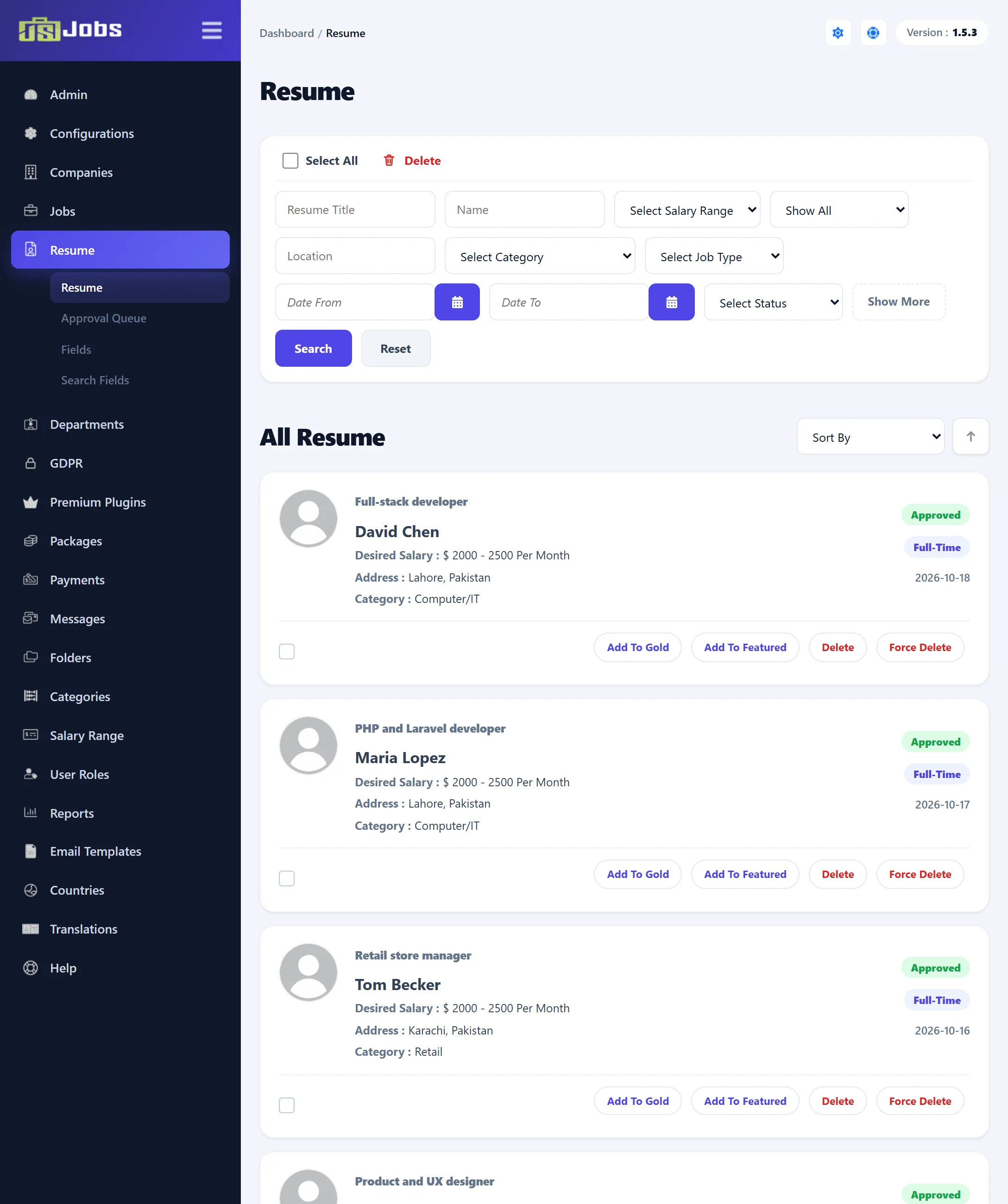
The administrator cannot add a resume from here. Resumes are created by job seekers on the site, and by visitors who apply without an account.
What each resume shows
Section titled “What each resume shows”| Part | Shows |
|---|---|
| Photo | The job seeker’s photo, or a placeholder. |
| Title and name | The resume’s Application Title and the job seeker’s first and last name. |
| Desired Salary, Address, Category | The desired salary range, the city of the most recently added address, and the category. The labels follow the titles set in Resume fields. |
| Status | Approved in green, or Rejected in red. |
| Gold, Featured (Pro) | Shown while the resume is gold or featured. Hover over the badge to see the expiry date. |
| Job type and date | The job type the job seeker wants, and the date the resume was created. |
Searching
Section titled “Searching”The filter bar has these boxes:
| Filter | What it matches |
|---|---|
| Resume Title | Part of the application title. |
| Name | Part of the first, middle or last name. |
| Select Salary Range | The desired salary range. |
| Show All (Pro) | Gold, Featured, or Gold & Featured: only resumes whose gold or featured period has not expired. |
| Location | Part of the city name of the resume’s most recent address. |
| Select Category | The resume’s category. |
| Select Job Type | Full-time, Part-time or Internship. |
| Date From, Date To | The date the resume was created. |
| Select Status | Approved or Rejected. |
Show More shows or hides the second row of filters. Click Search to apply, or Reset to clear every filter.
AI Resume Search
Section titled “AI Resume Search”When Admin Resume List AI Filter is set to Yes under Configurations, the filter bar is replaced by a single AI Resume Search box. Type what you are looking for in plain words and click Search Resume. The search runs over the text JS Jobs keeps for each approved resume, and lists the best matches.
When Admin Suggested Resumes Button is set to Yes, the Jobs list shows a Suggested Resumes link for each job. It opens this list with the approved resumes that best match that job.
Sorting
Section titled “Sorting”Sort By orders the list by Application Title, First Name, Category, Job Type, Location, Status, Created or Viewed (how often the resume has been viewed). The arrow beside it swaps between ascending and descending. Until you choose, the newest resumes come first.
Gold and featured resumes (Pro)
Section titled “Gold and featured resumes (Pro)”Gold and featured resumes stand out to employers on the site. Job seekers usually get them through a package; as the administrator you can grant or end them here.
| Button | What it does |
|---|---|
| Add To Gold | Makes the resume gold from today for the number of days in Gold Resume Expire In Days (Configurations → Job Seeker). If the resume is already gold and has not expired, nothing changes. |
| Remove Gold | Shown instead while the resume is gold. Ends gold status at once. |
| Add To Featured | Makes the resume featured for the number of days in Featured Resume Expire In Days. |
| Remove Featured | Shown instead while the resume is featured. Ends featured status at once. |
Gold and featured status that a job seeker requests on the site, and that is not approved automatically, waits in the approval queue.
Deleting resumes
Section titled “Deleting resumes”Both delete buttons ask you to confirm first.
- Delete removes a resume that has no applications, together with its addresses, education, employers, languages and references. A resume that has been used to apply for a job is not deleted, and you see an error. To delete several resumes, tick them (or Select All) and click Delete at the top of the list; resumes with applications are skipped.
- Force Delete removes the resume even if it has applications. It also deletes those applications and removes the resume from every employer’s folders. This cannot be undone.
After either delete, the job seeker is sent the resume-deleted e-mail when Resume Delete is switched on for job seekers under Email Templates → Options.