
Browse-by modules
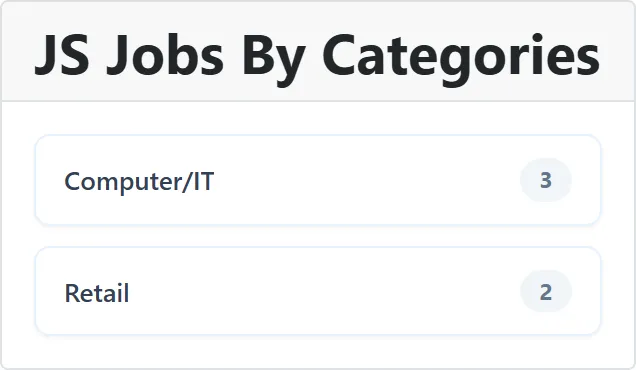
Four modules give visitors a quick way into the job list: a set of link tiles, one per category, city, state or country, each with the number of jobs it has. Clicking a tile opens the job list for that entry.
| Module | One tile per | Order |
|---|---|---|
| JS Jobs By Categories | Active category | Alphabetical |
| JS Jobs By Cities | City, in an enabled country | Most jobs first, then by name |
| JS Jobs By States | State, in an enabled country | Most jobs first, then by name |
| JS Jobs By Countries | Enabled country | Most jobs first, then by name |
How the counts work
Section titled “How the counts work”The count on each tile is live, worked out each time the page loads:
| Module | Counts |
|---|---|
| JS Jobs By Categories | Approved jobs in the category whose publishing period includes today. |
| JS Jobs By Cities | Approved jobs listed in the city that haven’t reached their stop publishing date. |
| JS Jobs By States | Approved jobs in any city of the state whose publishing period includes today. |
| JS Jobs By Countries | Approved jobs in any city of the country that haven’t reached their stop publishing date. |
A job listed in several cities counts once in each of them, and once in the state or country. The cities and countries counts also include jobs whose start publishing date is still to come.
Which countries are enabled, and their states and cities, is managed under Countries. Categories are managed under Categories; a category that is not active never shows.
Settings
Section titled “Settings”All four modules have the same settings.
| Setting | Default | What it does |
|---|---|---|
| Number of entries | 12 | How many tiles to show, from 1 to 100. |
| Only entries with jobs | Yes | Yes leaves out entries with no jobs at the moment. No shows them with a count of 0. |
| Job count badge | Show | Shows the number of jobs on each tile. |
| Link target menu item | The menu item the job list opens in. |
With Only entries with jobs set to No, the cities and states modules can list a great many entries with 0 jobs, since every city of every enabled country qualifies. Keep Number of entries low, or leave the setting at Yes.
When no entry qualifies, the module shows “Nothing to browse yet”.
Placing them
Section titled “Placing them”See Modules and plugins. The same tiles can go inside an article with the JS Job By Categories, JS Jobs BY Cities, JS Jobs By States and JS Jobs By Countries content plugins; see Content plugins.