
The companies list
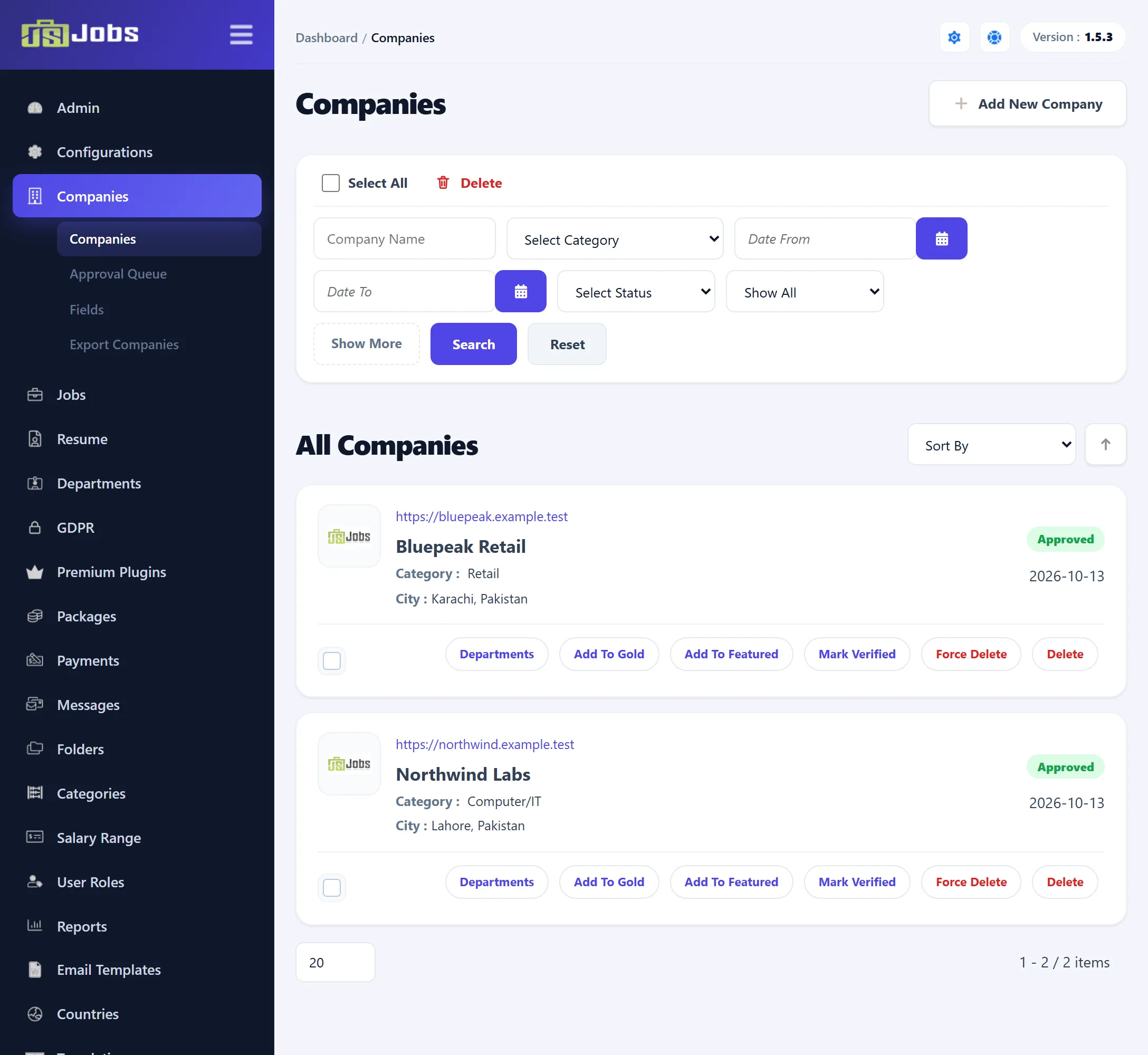
Companies → Companies lists the approved and rejected companies on the site. Companies still waiting for approval are in Companies → Approval Queue (see Approval queues). Click a company’s name or logo to edit it, or Add New Company to add one (see Adding and editing a company).
Joomla’s toolbar has New, Edit, Delete and Cancel.
Searching
Section titled “Searching”| Filter | What it matches |
|---|---|
| Company Name | Part of the company’s name. |
| Select Category | The company’s category. |
| Date From, Date To | The date the company was added. Shown with Show More. |
| Select Status | Approved or Rejected. |
| Gold and featured list (Pro) | Show All, Gold, Featured or Gold & Featured. Only companies whose gold or featured period hasn’t ended count. |
Click Search to apply, or Reset to clear the filters.
Sort By orders the list by Category, Created, Status, Location, Company Name or Viewed; the arrow beside it swaps the direction. Until you choose, the newest companies come first.
What each row shows
Section titled “What each row shows”Each company shows its logo, website address (click it to open the site in a new tab), name, category and city, and the date it was added. The labels at the top right:
- Gold and Featured (Pro) while the company’s gold or featured period runs; point at the label to see its Expiry Date.
- Verified (Pro) when you have marked the company verified.
- Approved or Rejected.
Row actions
Section titled “Row actions”| Action | What it does |
|---|---|
| Departments | Opens the departments list filtered to this company. See Departments. |
| Add To Gold / Remove Gold (Pro) | Makes the company gold for a set number of days, or ends it. See Gold and featured. |
| Add To Featured / Remove Featured (Pro) | The same for featured. |
| Mark Verified / Remove Verified (Pro) | Adds or removes the verified mark. |
| Force Delete | Deletes the company together with its jobs and departments. |
| Delete | Deletes the company if it has no jobs or departments. |
Verified companies (Pro)
Section titled “Verified companies (Pro)”Mark Verified tells job seekers you have checked the company. The company gets a Verified label on this list and a Verified Company badge on its page on the site. The message reads “Company marked as verified”. Remove Verified takes the mark away (“Company verification removed”).
Verifying is your own judgement; JS Jobs doesn’t check anything itself.
Deleting companies
Section titled “Deleting companies”Both links ask you to confirm first, and both send the Company Delete e-mail (see Email Templates).
- Delete removes a company only if it has no jobs and no departments. Otherwise the company stays and you see an error. The toolbar’s Delete and the Delete link beside Select All do the same for every ticked company.
- Force Delete removes the company, all of its jobs and all of its departments. This cannot be undone.