
Login and registration
Three extensions deal with logging in and signing up:
| Extension | Type | Edition |
|---|---|---|
| JS Jobs Login | module | Free and Pro |
| JSJobs Register | system plugin | Free and Pro |
| JSJobs Login Redirect | user plugin | Pro |
JS Jobs Login module
Section titled “JS Jobs Login module”A login box for a sidebar or any module position. Visitors who aren’t logged in see a username and password form, a remember-me tick box (when Joomla’s System - Remember Me plugin is enabled), the log-in button, and links to reset a forgotten password or username. If Allow User Registration is on in Joomla’s Users options, a “Create an account” link to Joomla’s registration form is added. Logged-in users see a greeting and a log-out button.
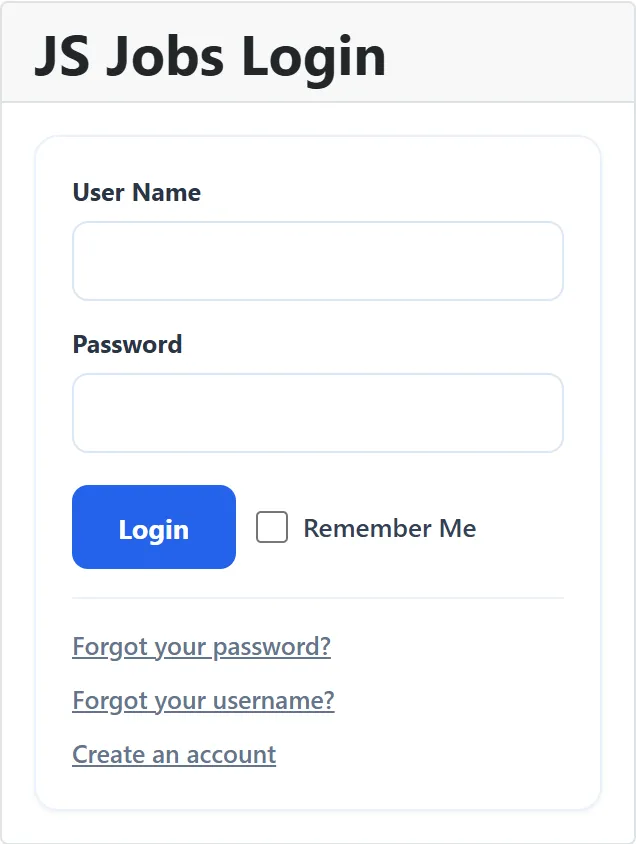
| Setting | Default | What it does |
|---|---|---|
| Module Class Suffix | Joomla’s usual extra CSS class. | |
| Pre-text | Text or HTML above the login form. | |
| Post-text | Text or HTML below the login form. | |
| Login Redirection Page | JS Jobs Control Panel | Where users go after logging in. JS Jobs Control Panel sends employers to the employer control panel and job seekers to theirs, or back to the job board page that asked them to log in. Joomla Home Page sends everyone to your home page. |
| Logout Redirection URL | The menu item to show after logging out. With none chosen, the user stays on the page they were on. | |
| Greeting | Yes | Shows “Hi” and the user’s name when they are logged in. |
| Name/Username | User Name | Whether the greeting uses the user’s User Name or their Name. |
| Encrypt Login Form | No | Sends the form over https. Only turn it on if your site works over https. |
JS Jobs Control Panel opens the job board inside your JS Jobs menu item, so the job board keeps its usual template and modules. When the JSJobs Login Redirect plugin (below) has a page set for the user’s role, that page wins.
The module’s other Joomla settings (Position, Menu Assignment and so on) work as for any module; see Modules and plugins.
JSJobs Register plugin
Section titled “JSJobs Register plugin”JS Jobs has its own registration page, where new users choose to be an employer or a job seeker. The JSJobs Register plugin is what gives the new account that role, so it must be enabled under System → Manage → Plugins. Without it, the registration page shows “Please install or enable the JS Jobs register plugin” where the role should be.
When someone registers there, the plugin:
- gives them the employer or job seeker role;
- sets them up in JS Jobs, including any package set to be auto-assigned (see How packages work);
- sends them to the page set under Configurations → Login/Register in Employer Successfully Registration Redirect Page or Jobseeker Successfully Registration Redirect Page.
When you delete a user in Joomla, the plugin removes their JS Jobs role too.
Setting
Section titled “Setting”The plugin has one setting, labelled User Register in Role:
| Choice | What the registration page does |
|---|---|
| Any (default) | Shows a list so the new user chooses Employer or Job Seeker. |
| Employer | Registers everyone as an employer. |
| Job Seeker | Registers everyone as a job seeker. |
A link to the registration page that names a role itself, as the register links in the job board’s own pages do, uses that role whatever the setting.
JSJobs Login Redirect plugin
Section titled “JSJobs Login Redirect plugin”Sends employers and job seekers to a page of your choice after they log in through Joomla’s login, including the JS Jobs Login module. Logins to the administrator are not affected.
| Setting | Default | What it does |
|---|---|---|
| Login Redirect Enable | Yes | Turns the redirect on or off. |
| Employer Default Login Redirect | The menu item employers go to after logging in. | |
| Jobseeker Default Login Redirect | The menu item job seekers go to. |
A role with no menu item chosen is left alone: the user goes wherever the login form would have sent them. Users with no JS Jobs role are never redirected. Enable the plugin under System → Manage → Plugins before relying on it.