
Job seeker settings
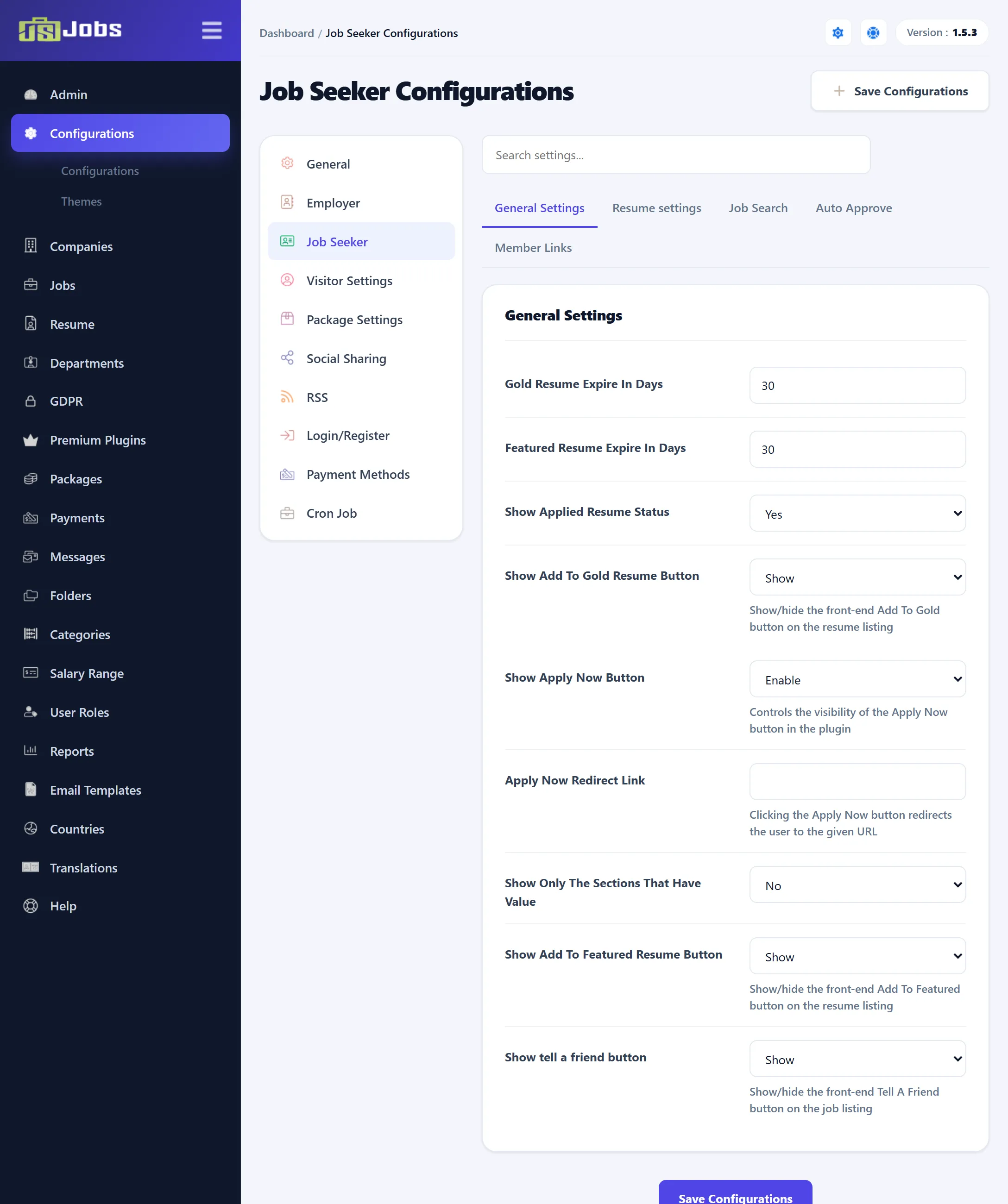
Open Components → JS Jobs → Configurations and click Job Seeker in the list on the left. The page is headed Job Seeker Configurations and saves on its own: click Save Configurations before you move to another section.
Settings marked (Pro) belong to features of JS Jobs Pro.
General Settings
Section titled “General Settings”| Setting | Default | What it does |
|---|---|---|
| Gold Resume Expire In Days (Pro) | 30 | How long a resume stays gold, when packages aren’t required. When they are, the package sets the number of days. |
| Featured Resume Expire In Days (Pro) | 30 | The same for featured resumes. |
| Show Applied Resume Status | Yes | Shows job seekers the status the employer gave their application, on My Applied Jobs and on the control panel. |
| Show Add To Gold Resume Button (Pro) | Show | Shows the button that lets a job seeker make a resume gold from My Resumes. |
| Show Apply Now Button | Enable | Disable removes the Apply Now button from the jobs list, the job’s page, the quick view and the shortlist. |
| Apply Now Redirect Link | Empty | A web address that Apply Now opens, in a new tab, instead of JS Jobs’ own apply form. A job that has its own apply link keeps using that. Leave it empty to use the apply form. If you leave out https://, it is added when you save; an address that isn’t valid is not saved. |
| Show Only The Sections That Have Value | No | Yes hides the empty sections (addresses, education, employers and so on) when a resume is viewed or printed. |
| Show Add To Featured Resume Button (Pro) | Show | The same as the gold button, for featured resumes. |
| Show Tell a Friend Button (Pro) | Show | Shows the Tell A Friend button on the jobs list and the shortlist, for sending a job to someone by e-mail. |
Resume Settings
Section titled “Resume Settings”| Setting | Default | What it does |
|---|---|---|
| Resume Photo Size Allowed | 900 | The largest resume photo, in KB. |
| Number Of Employers Allowed | 5 | How many past employers one resume can list. |
| Number Of Addresses Allowed | 5 | How many addresses one resume can hold. |
| Number Of Institute Allowed | 5 | How many schools or other institutes one resume can list. |
| Number Of Languages Allowed | 5 | How many languages one resume can list. |
| Number Of References Allowed | 5 | How many references one resume can hold. |
The number of files a resume can carry, and their size, are on the Site Settings tab of General settings.
Job Search
Section titled “Job Search”| Setting | Default | What it does |
|---|---|---|
| Allow Save Search | Yes | Shows the button on the jobs list that lets a job seeker save a search and run it again from Job Save Searches. The button is hidden while the AI job search form or AI filter is on. |
Auto Approve
Section titled “Auto Approve”| Setting | Default | What it does |
|---|---|---|
| Resume Auto Approve | Yes | Yes publishes new resumes at once. No sends them to Resume → Approval Queue. |
| Gold Resume Auto Approve (Pro) | Yes | Yes grants a request to make a resume gold at once; No leaves it waiting for you. |
| Featured Resume Auto Approve (Pro) | Yes | The same for featured resumes. |
| Job Alert Auto Approve (Pro) | Yes | Yes approves new job alerts at once. No saves them as Pending Approval in Jobs → Job Alert; they get no e-mails until you approve them. |
Member Links
Section titled “Member Links”Job Seeker Top Menu Links are the links in the bar across the top of the component’s pages, as a logged-in job seeker sees them: Control Panel, Newest Jobs, Job Categories, Search Jobs and My Resumes. Each is Show by default.
Job Seeker Control Panel Links choose what the job seeker control panel shows. All are Show (or Yes) by default.
| Setting | What it shows |
|---|---|
| Newest Jobs Counts, Applied Jobs Counts, My Resumes Counts, Job Save Searches Counts | The number boxes at the top of the control panel. |
| Add Resume | The link to the resume form. |
| Active Jobs Graph | The chart of active jobs. |
| My Stuff Area, My Stats Area | The two groups of links. |
| Applied Resume Box | The list of the job seeker’s applications. |
| Suggested Jobs Box | The box of jobs suggested for the job seeker. |
| Jobs By Categories, All Companies, Job By Types | Links to those listings. |
| Short Listed Jobs (Pro) | The job seeker’s shortlist. |
| User data request | The User Data link, where a job seeker asks for their data to be erased. See GDPR. |
| Job Save Searches | The job seeker’s saved searches. |
| My Cover Letters, Add Cover Letter | The cover letter pages. |
| Purchase History, Packages | The job seeker’s purchases and the packages on sale. |
| Expire Package Message | A message on the control panel when the job seeker’s package has expired. |
| Show Login/logout Button | A Login or Logout button on the control panel. |
| Job Seeker Profile | The link to the job seeker’s profile. |
| Short Listed Jobs Button (Pro) | The shortlist button on each job in the jobs list. |
| My Stats | The job seeker’s statistics page. |
| Job Alert (Pro) | The job alert form. |
| Messages (Pro) | The job seeker’s messages. |
| Jobs RSS (Pro) | The jobs RSS feed. |
What a visitor sees on the job seeker control panel is set separately, under Visitor settings.