
Listings, maps and integrations
These tabs sit in the General section of Components → JS Jobs → Configurations, next to the ones on General settings. Click Save Configurations to keep your changes.
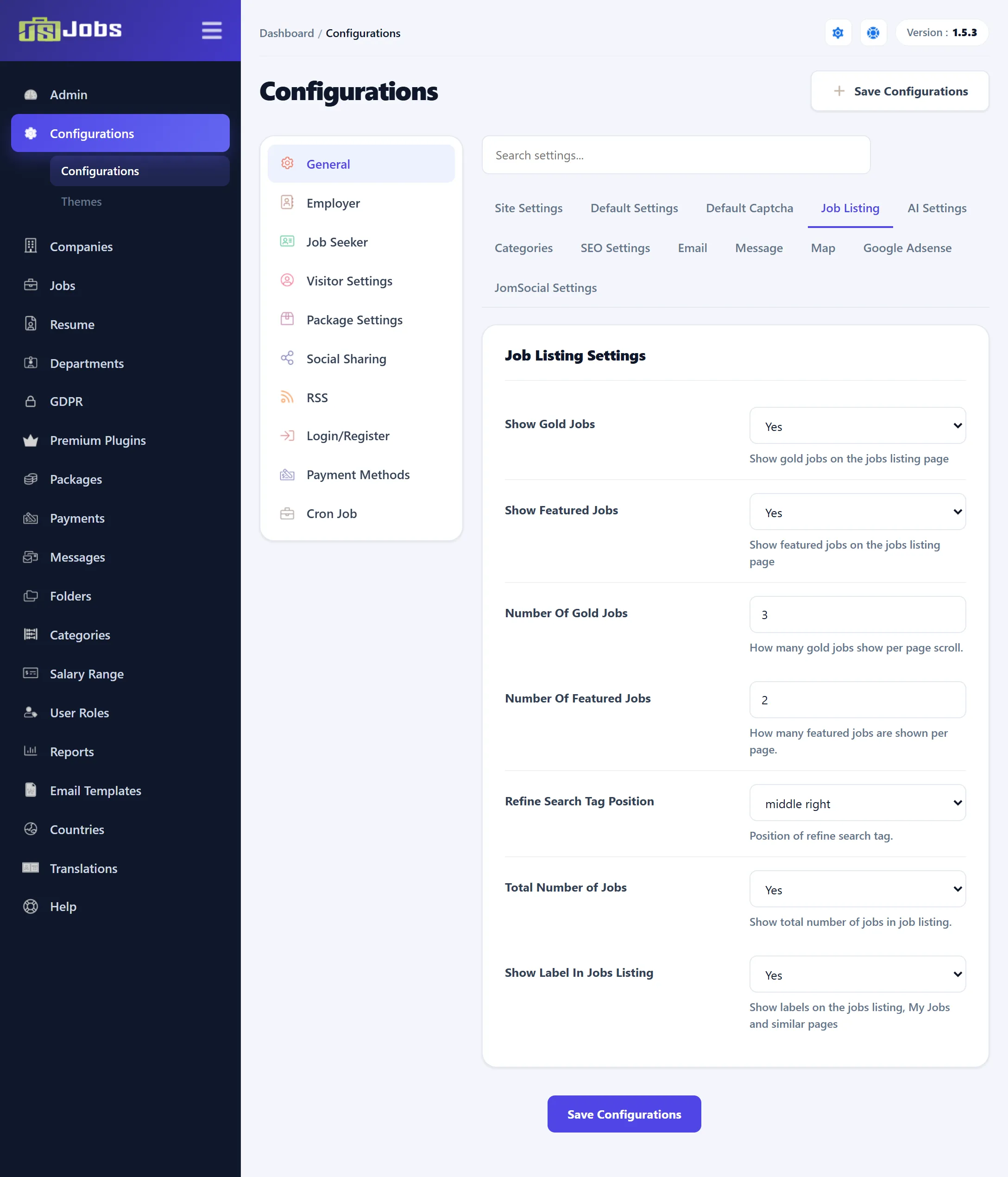
Job Listing
Section titled “Job Listing”| Setting | Default | What it does |
|---|---|---|
| Show Gold Jobs (Pro) | Yes | Mixes gold jobs into the jobs list. |
| Show Featured Jobs (Pro) | Yes | Mixes featured jobs into the jobs list. |
| Number Of Gold Jobs (Pro) | 3 | How many gold jobs are added each time the list loads more jobs. |
| Number Of Featured Jobs (Pro) | 2 | How many featured jobs are added each time the list loads more jobs. |
| Refine Search Tag Position | middle right | Where the tab that opens the refine-search panel sits on the jobs list: Top left, Top right, middle left, middle right, bottom left, bottom right, or None to hide it. The tab is also hidden while the AI job search form or the AI job list filter is on. |
| Total Number of Jobs | Yes | Shows how many jobs the list holds. |
| Show Label In Jobs Listing | Yes | Shows the name of each field (such as “Category:”) in front of its value in the jobs list, My Jobs and similar lists. |
AI Settings
Section titled “AI Settings”These switches turn on JS Jobs’ “AI” search and suggestions. They work on your own database by matching the words people type against your jobs and resumes; nothing is sent to an outside service. All are off on a new install.
| Setting | Default | What it does |
|---|---|---|
| AI Job Search Form (Pro) | No | Shows the AI search form on the job search page. |
| AI Job List Filter (Pro) | No | Shows the AI filter on the jobs list. |
| Show Suggested Jobs Button | No | Adds a Suggested Jobs button to each resume on the job seeker’s My Resumes page. It lists jobs that match that resume. |
| Suggested Jobs On Dashboard (Pro) | No | Shows suggested jobs on the job seeker’s control panel. |
| AI Resume Search Form (Pro) | No | Shows the AI search form on the resume search page. |
| AI Resume List Filter (Pro) | No | Shows the AI filter on the resume list. |
| Show Suggested Resumes Button | No | Adds a suggested-resumes button to each job on the employer’s My Jobs page. |
| Suggested Resumes On Dashboard (Pro) | No | Shows suggested resumes on the employer’s control panel. |
| Admin Job List AI Filter | No | Shows the AI filter on the administrator’s Jobs list. |
| Admin Resume List AI Filter | No | Shows the AI filter on the administrator’s Resume list. |
| Admin Suggested Resumes Button (Pro) | No | Adds a Suggested Resumes link to each job in the administrator’s Jobs list. |
Message
Section titled “Message”| Setting | Default | What it does |
|---|---|---|
| Message Auto Approve | Yes | Publishes messages between employers and job seekers at once. No sends every message to Messages → Approval Queue first. |
| Conflict Message Auto Approve | No | What happens to a message that contains an e-mail address, a web address or a phone number. No holds it in the approval queue, so people can’t swap contact details without you seeing it. Yes publishes it like any other. |
| Setting | Default | What it does |
|---|---|---|
| Map | Show Map opens a map. Click a spot to fill in Latitude and Longitude. | |
| Google Map API key | A key shipped with the install | The Google Maps key used by every JS Jobs map: on the job, company and resume forms, the job and resume pages, job search and the jobs-on-map module. Get API key from here links to Google. Use a key of your own. |
| Latitude | 31.5166667 | Where maps start when a record has no location yet. |
| Longitude | 74.3833333 | As above. The two shipped values point at Lahore. |
| Default Map Radius Type | Kilometers | The unit first selected for the radius in a search by map position: Meters, Kilometers, Miles or Nautical Miles. |
Google Adsense
Section titled “Google Adsense”Ads are placed between the jobs of the jobs list.
| Setting | Default | What it does |
|---|---|---|
| Google Adsense Client Id | ca-pub-8827762976015158 | Your AdSense publisher ID. |
| Google Adsense Slot Id | 9560237528 | The ad unit’s slot ID. |
| Google Ads Custom Css | Empty | CSS declarations for the box that holds each ad, for example margin: 10px 0;. |
| Show Google Ads In List Jobs | Hide | Show turns the ads on. |
| Google Ads Show After Number Of Jobs | 4 | An ad is placed after every this many jobs. |
| Google Ads Width | 717 | Width of the ad, in pixels. |
| Google Ads Height | 90 | Height of the ad, in pixels. |
JomSocial Settings
Section titled “JomSocial Settings”These settings link JS Jobs with the JomSocial community component. They only work when JomSocial is installed and the JS Jobs JomSocial plugin, sold separately (see Premium Plugins in the JS Jobs menu), is installed and enabled.
| Setting | Default | What it does |
|---|---|---|
| Enable JomSocial Integration | No | Turns the integration on. Leave it off unless JomSocial is installed. |
| Post New Company | No | Meant to post to the JomSocial activity stream when a company is created. In 1.5.3 this setting has no effect. |
| Post New Job | No | The same for new jobs. In 1.5.3 this setting has no effect. |
| Post New Resume | No | The same for new resumes. In 1.5.3 this setting has no effect. |
| Allow Post Company | No | Lets employers post a company to JomSocial from My Companies. |
| Allow Post Job | No | Lets employers post a job to JomSocial from My Jobs. |
| Allow Post Resume | No | Lets job seekers post a resume to JomSocial from My Resumes. |
Job Sharing
Section titled “Job Sharing”A Job Sharing tab with a default country, state and city exists in the code but never appears in 1.5.3, because the sharing service it belongs to is no longer available. See Job sharing service.