
Job seeker packages
Packages → Job Seeker Packages lists the packages job seekers can buy or be given. Each package sets how many resumes and cover letters a job seeker may have, how many jobs they may apply for, whether they can search for jobs and set up job alerts, and how long the package lasts. How these numbers are checked is explained in How packages work.
The list works like the employer one: filter by Title, Price or status, click a title to edit, and tick packages and click Delete to remove them. A package that anyone has bought can’t be deleted; unpublish it instead.
Adding a package
Section titled “Adding a package”-
Click Add Job Seeker Package. The form is headed Form Job Seeker Package.
-
Fill in the fields below. Title, Price, Expire In Days and Description are required.
-
Click Save Job Seeker Package.
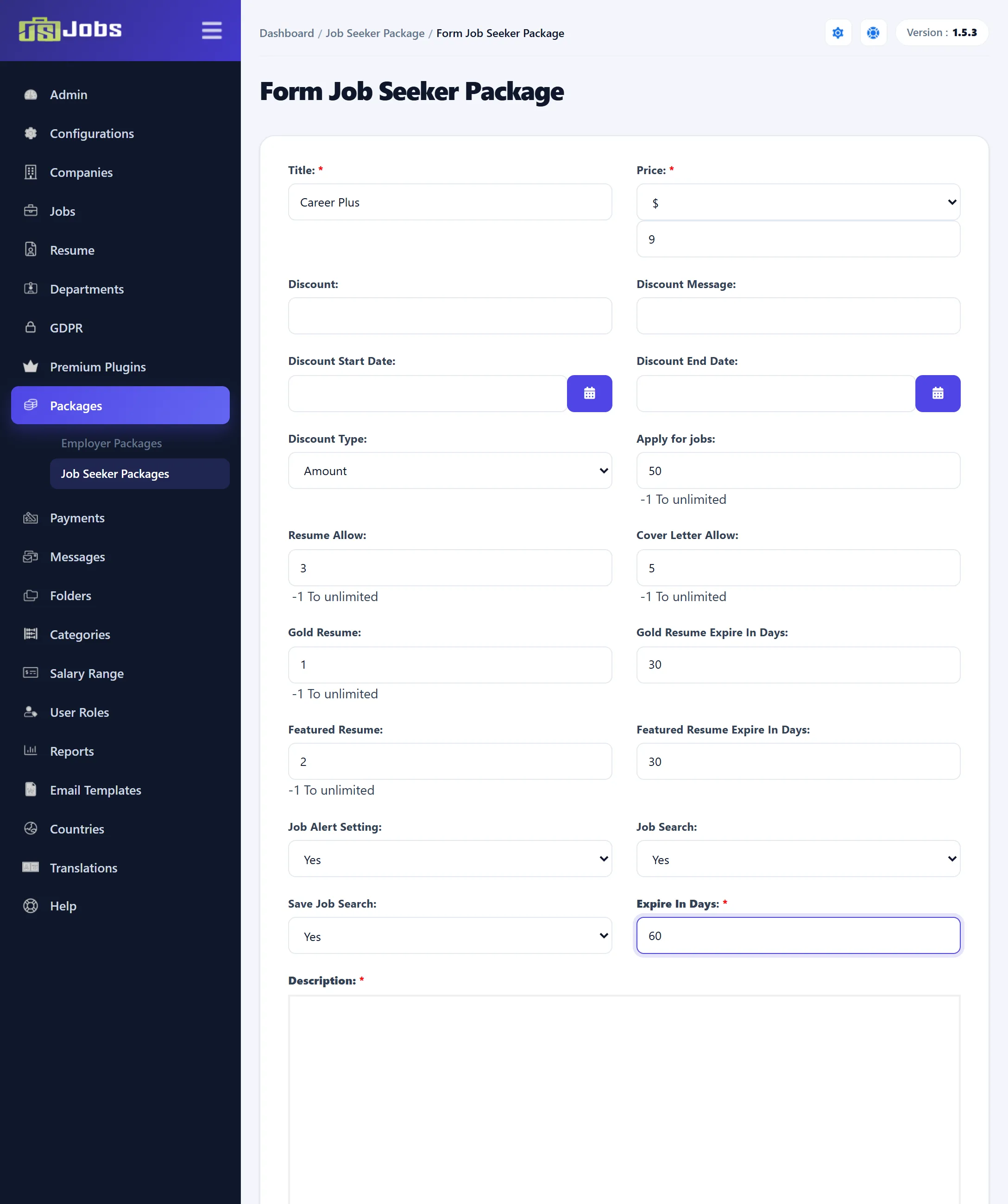
For every number marked “-1 To unlimited”, enter -1 for no limit or 0 for none.
| Field | What it does |
|---|---|
| Title | The package name job seekers see. |
| Price | The currency and the amount. 0 makes it a free package. |
| Discount | The discount, as a whole number. With Amount it can’t be more than the price; with % it can’t be more than 100. |
| Discount Message | A short line about the offer, saved with each purchase. |
| Discount Start Date, Discount End Date | The discount applies only to purchases between these dates, so set both. The start must be before the end. |
| Discount Type | Amount or %. |
| Apply for jobs | How many applications the job seeker may send in total. |
| Resume Allow | How many resumes the job seeker may have. |
| Cover Letter Allow | How many cover letters the job seeker may have. |
| Gold Resume (Pro) | How many of their resumes may be gold. |
| Gold Resume Expire In Days (Pro) | How long a resume stays gold. |
| Featured Resume (Pro) | How many of their resumes may be featured. |
| Featured Resume Expire In Days (Pro) | How long a resume stays featured. |
| Job Alert Setting (Pro) | Yes lets the job seeker set up job alerts. |
| Job Search | Yes lets the job seeker use the job search form. |
| Save Job Search | Yes lets them save a search. |
| Expire In Days | How many days the package lasts, counted from the day it is bought. |
| Description | The full description, with the editor. |
| Status | Published or Un-published. New packages start as Published. |
The fields marked (Pro) are on the form in both editions, but gold and featured resumes and job alerts only work in Pro.
When you edit a saved package, the form also shows a link field for each payment method that needs one, as on the employer form.
Things to keep in mind
Section titled “Things to keep in mind”- Resume Allow, Cover Letter Allow and Apply for jobs count everything the job seeker has ever made, not just what they made under this package. A job seeker who has already sent 10 applications and buys a package with Apply for jobs set to 10 can’t apply again. Size these allowances with that in mind, or use -1.
- The checks only run when Package Required For Job Seeker is Yes under Configurations → Package Settings.
- The discount works as described for employer packages.