
Resume modules
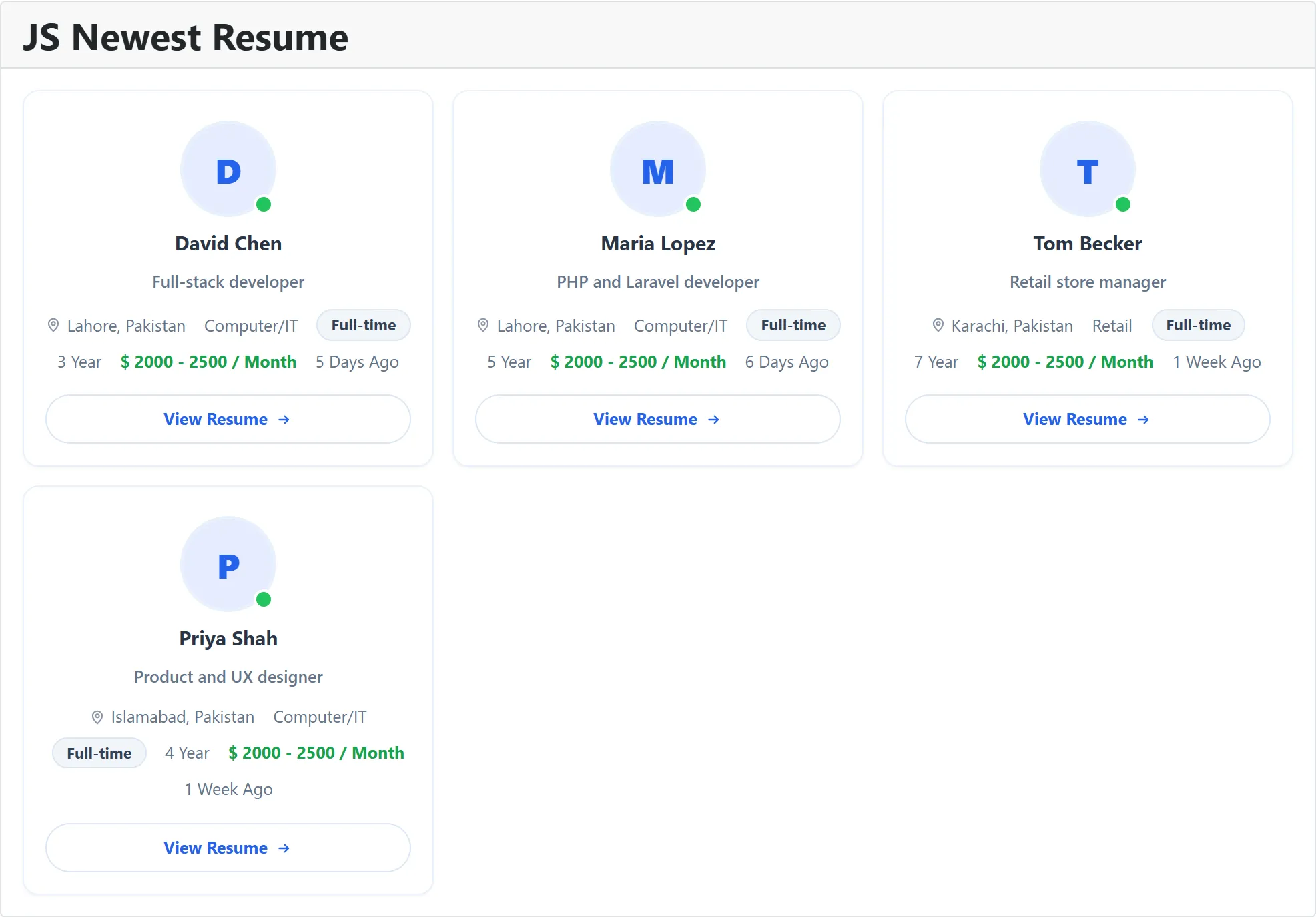
Four modules show job seekers’ resumes as profile tiles, mostly for employers browsing the site. They have the same settings and differ in which resumes they pick.
| Module | Picks | Order |
|---|---|---|
| JS Newest Resume | All listed resumes | Newest first |
| JS Top Resume | All listed resumes | Most viewed first. Each tile also shows “N views”. |
| JS Featured Resumes | Listed resumes that are featured and whose featured period hasn’t ended | Newest first |
| JS Gold Resumes | Listed resumes that are gold and whose gold period hasn’t ended | Newest first |
Which resumes are listed
Section titled “Which resumes are listed”A resume is listed when it is approved and the job seeker has left it searchable. On top of that, the modules follow each resume’s privacy choice:
- Visitors and job seekers see only resumes whose privacy is open to everyone.
- Logged-in employers see every approved, searchable resume.
Clicking a tile opens the resume as the visitor is allowed to see it.
What a tile shows
Section titled “What a tile shows”Depending on the settings: the job seeker’s photo with a dot that is green when they have ticked that they are available, their name (or the resume title when the name is hidden), the resume title, location, category, the job type they want as a chip, their experience, the salary they want, and when the resume was posted. Gold and featured resumes get Gold and Featured badges. Each tile ends with a View Resume button.
Settings
Section titled “Settings”| Setting | Default | What it does |
|---|---|---|
| Number of resumes | 6 | How many resumes to show, from 1 to 30. |
| Layout | Grid | Grid (tiles side by side), List or Compact. |
| Grid columns | 3 | With Grid, how many tiles per row: 2, 3 or 4. |
| Photo | Show | Shows the job seeker’s photo. |
| Availability dot | Show | Shows the green or grey dot on the photo. |
| Name | Show | Shows the job seeker’s name. |
| Resume headline | Show | Shows the resume’s title line. |
| Category | Show | Shows the resume’s category. |
| Work preference | Show | Shows the job type the job seeker wants. |
| Experience | Show | Shows their experience. |
| Desired salary | Show | Shows the salary they want, when they gave one. |
| Location | Show | Shows the city from their first address. |
| Posted date | Show | Shows when the resume was posted. |
| Link target menu item | The menu item the resume links open in. |
If you don’t want job seekers’ names on a public page, set Name to Hide; the tile then shows the resume title instead.
Good to know
Section titled “Good to know”- JS Featured Resumes and JS Gold Resumes stay empty (“No resumes found”) until a job seeker’s resume is made featured or gold. Job seekers do this from their resume, within their package’s allowance. See How packages work.
- JS Top Resume ranks by how many times each resume has been opened.
To place a module, see Modules and plugins. The matching content plugins show the same lists in an article.