
Themes
System → Themes sets the colours of the help desk’s front-end pages: the dashboard, ticket form, ticket lists and ticket pages your customers and staff see. The administrator screens are not affected.
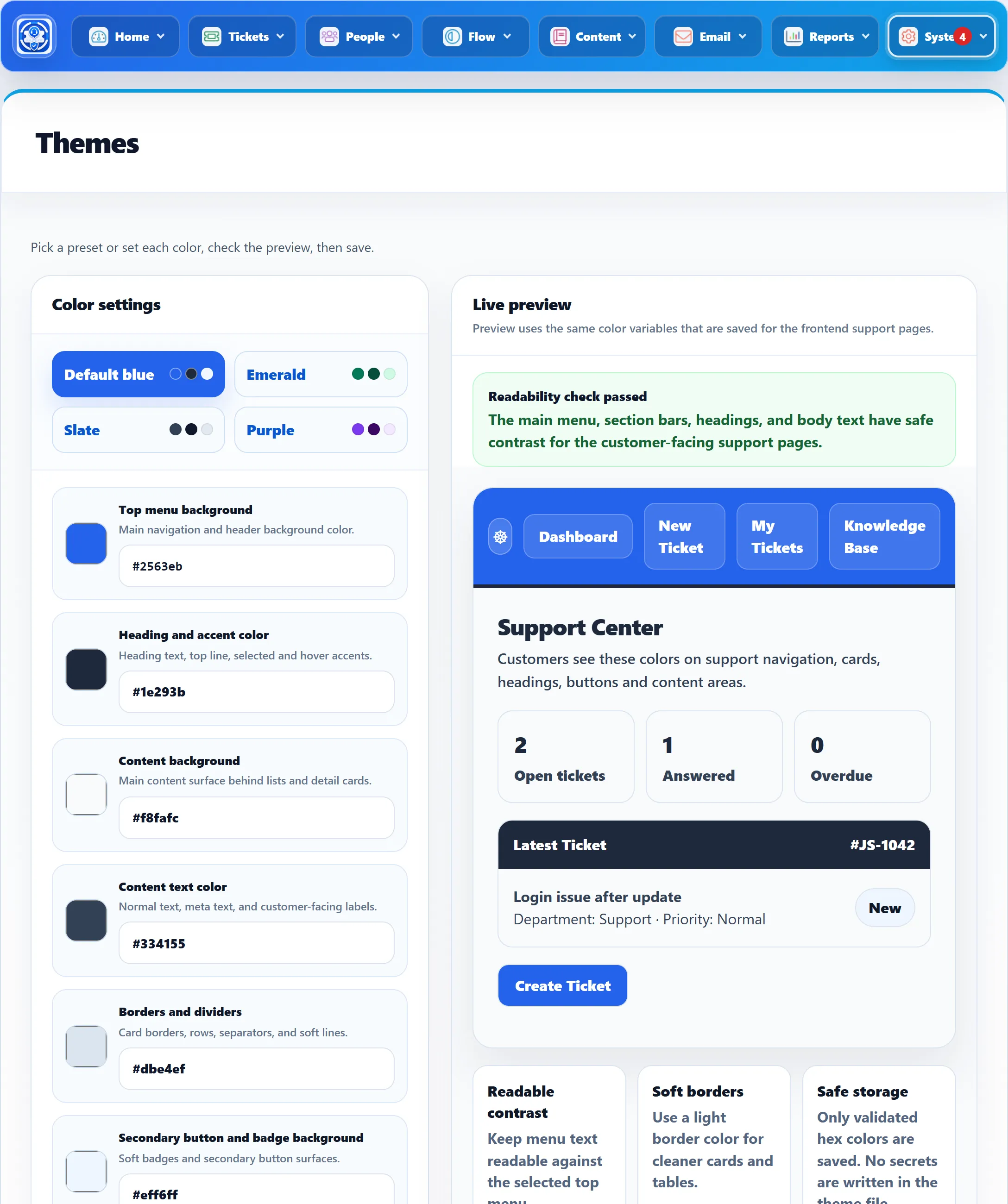
Changing the colours
Section titled “Changing the colours”- Click a preset (Default blue, Emerald, Slate or Purple), or set each colour yourself.
- Watch Live preview, a small mock-up of a support page in your colours, and the Readability check above it.
- Click Save theme.
You see “Theme has been saved successfully.” Customers see the new colours on their next page load.
The colours
Section titled “The colours”Pick a colour with the swatch, or type a six-digit hex code such as #2563eb
in the box under it.
| Colour | Used for | Default |
|---|---|---|
| Top menu background | The main navigation and header background. | #2563eb |
| Heading and accent color | Heading text, the top line, and selected and hover accents. Dark section bars use it as their background. | #1e293b |
| Content background | The surface behind lists and detail cards. | #f8fafc |
| Content text color | Normal text, small print and labels. | #334155 |
| Borders and dividers | Card borders, row separators and other soft lines. | #dbe4ef |
| Secondary button and badge background | Soft badges and secondary buttons. | #eff6ff |
| Header and action text | Text in the top menu, on dark section bars and on main buttons. | #ffffff |
Reset to default puts the Default blue colours back in the form. Click Save theme to keep them.
The readability check
Section titled “The readability check”So that customers never get pages they can’t read, four pairs of colours must have enough contrast before the theme can be saved:
| Text | Against | Minimum contrast |
|---|---|---|
| Header and action text | Top menu background | 3:1 |
| Header and action text | Heading and accent color (dark section bars) | 4.5:1 |
| Heading and accent color | Content background | 3:1 |
| Content text color | Content background | 4.5:1 |
While a pair is too close, the check turns to “Readability needs attention” and lists the pairs with their contrast. Save theme then asks you to fix the warnings first, and the server checks again on save: “Theme colors were not saved because some color pairs are not readable:” followed by the pairs. All four presets pass.
If the theme can’t be saved
Section titled “If the theme can’t be saved”The colours are written to a small file in the component,
components/com_jssupportticket/include/css/color.php. If that file, or its
folder, can’t be written by the web server, the screen shows “Theme color file
needs attention.” with the path. You can still try colours in the preview, but
saving fails until the file is writable. Ask your host to fix the file
permissions.