
Performance and SLA
Reports → Performance and SLA answers the questions a support manager is usually asked: how fast do we reply, how long does it take to solve a ticket, did we keep our SLA promises, and how old is the queue.
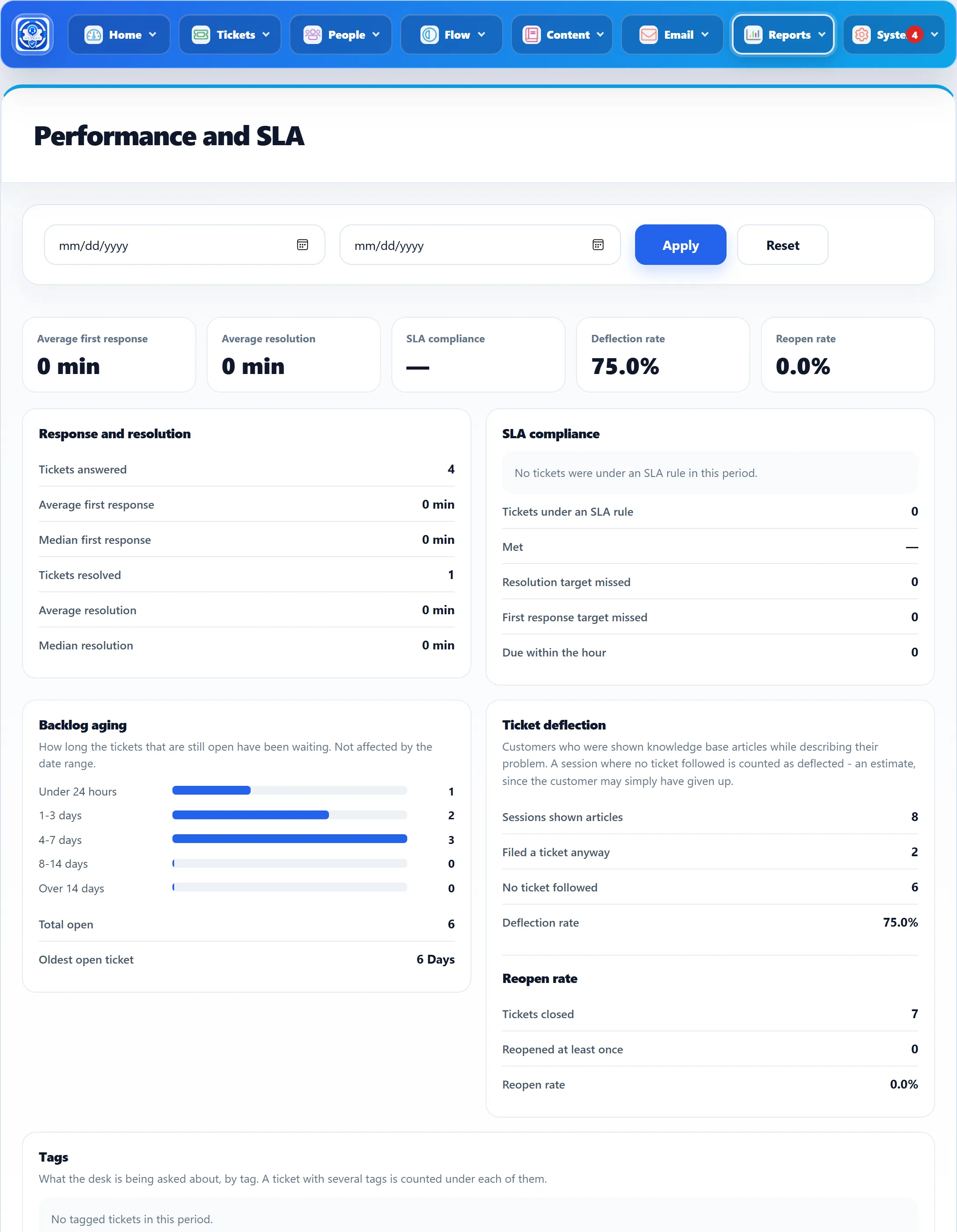
Choosing a period
Section titled “Choosing a period”The report shows all time until you pick a From date, a To date or both and click Apply. Reset goes back to all time. Tickets belong to the period by the day they were created. Two parts ignore the dates or use their own: Backlog aging always shows the queue as it is now, and Ticket deflection counts form sessions by the day they happened.
Times read as minutes (min) under an hour, hours (hrs) under a day and Days above that. A dash means there is nothing to measure yet.
The tiles
Section titled “The tiles”The five tiles at the top repeat the headline figure from each card below: Average first response, Average resolution, SLA compliance, Deflection rate and Reopen rate.
Response and resolution
Section titled “Response and resolution”| Figure | How it is worked out |
|---|---|
| Tickets answered | Tickets that have had a first staff reply. |
| Average first response / Median first response | Time from the ticket being created to the first staff reply. Only the first reply counts. |
| Tickets resolved | Tickets that have been closed at least once. |
| Average resolution / Median resolution | Time from the ticket being created to it being closed, minus any time its SLA clock was paused while waiting for the customer. If a ticket is reopened and closed again, the last close counts. |
Both times run around the clock, unless the ticket falls under an SLA rule with business hours; then only working hours count. The median is shown because one forgotten ticket can pull the average a long way.
Times are recorded as tickets are answered and closed in 1.3.0. Tickets answered or closed before you installed 1.3.0 have no times and are left out.
SLA compliance
Section titled “SLA compliance”Only tickets that fall under an SLA rule (Flow → SLA Rules) are counted here. Tickets with no rule are left out, not counted as passes.
| Figure | Meaning |
|---|---|
| Tickets under an SLA rule | Tickets in the period that an SLA rule applies to. |
| Met | The share of those tickets whose resolution target was not missed. |
| Resolution target missed | Tickets marked as breached. |
| First response target missed | Tickets whose first reply came after the first response target. |
| Due within the hour | Open tickets, not breached and not paused, still waiting for a first reply, whose first response is due within the next hour. These are the ones you can still save. |
With no SLA tickets in the period, the card says “No tickets were under an SLA rule in this period.” Breaches are found by the SLA check, which runs with the background jobs.
Backlog aging
Section titled “Backlog aging”How long the tickets that are still open (not closed or merged) have been waiting, counted from the day they were created: Under 24 hours, 1-3 days, 4-7 days, 8-14 days and Over 14 days, plus Total open and the age of the Oldest open ticket in days. Ages are counted in calendar days, so Under 24 hours means created today. The date range does not change this card.
Ticket deflection
Section titled “Ticket deflection”When a customer describes their problem on the ticket form, matching knowledge base articles can be suggested. Each form session where articles were shown is counted:
| Figure | Meaning |
|---|---|
| Sessions shown articles | Sessions where at least one article was suggested. |
| Filed a ticket anyway | Of those, sessions that still ended with a ticket. |
| No ticket followed | The rest. |
| Deflection rate | No ticket followed as a share of Sessions shown articles. |
This is an estimate: a customer who gave up is counted as deflected.
Reopen rate
Section titled “Reopen rate”Under the deflection figures, Reopen rate is the share of tickets created in the period that were reopened at least once. Reopened at least once is the number of those tickets. The first row, labelled Tickets closed, is in fact the number of all tickets created in the period, which is what the rate is divided by.
What your desk is asked about, by tag (Flow → Tags). Up to 25 tags are listed, most used first:
| Column | Shows |
|---|---|
| Tag | The tag’s name. |
| Tickets | Tickets in the period with that tag. A ticket with several tags counts under each. |
| Share | Those tickets as a share of all tickets in the period. |
| Closed | How many of them are closed. |
| Average resolution | Their average resolution time, in hours. |
The last row, Untagged, counts tickets with no tag at all. With no tagged tickets, the card says “No tagged tickets in this period.”