
Web services API
The Web Services - JS Support Ticket plugin adds the help desk’s ticket routes to Joomla’s web services API, so another system (a CRM, a shop, a monitoring tool) can list, read and create tickets and add replies.
Base address
Section titled “Base address”The routes live under Joomla’s API entry point:
https://example.com/api/index.php/v1/jssupportticketReplace https://example.com with your site’s address (include the folder if
Joomla is installed in one).
The plugin is switched on when the component is installed. If it is switched off under System → Manage → Plugins, these routes don’t exist and every call to them is answered with “not found”.
Routes
Section titled “Routes”| Method | Path | What it does |
|---|---|---|
GET |
/v1/jssupportticket/tickets |
Lists tickets. |
POST |
/v1/jssupportticket/tickets |
Creates a ticket. |
GET |
/v1/jssupportticket/tickets/{id} |
Returns one ticket. {id} is a number. |
POST |
/v1/jssupportticket/tickets/{id}/replies |
Adds a reply to a ticket. |
Authentication: API keys
Section titled “Authentication: API keys”These routes don’t use Joomla’s own API authentication, so the system calling them doesn’t need a Joomla user account or a Joomla API token. Each call is checked against the help desk’s own API keys instead, which you issue and revoke in the component.
A key only works while it exists and hasn’t expired. Each time a key is used, its Last used date is updated.
Issuing a key
Section titled “Issuing a key”-
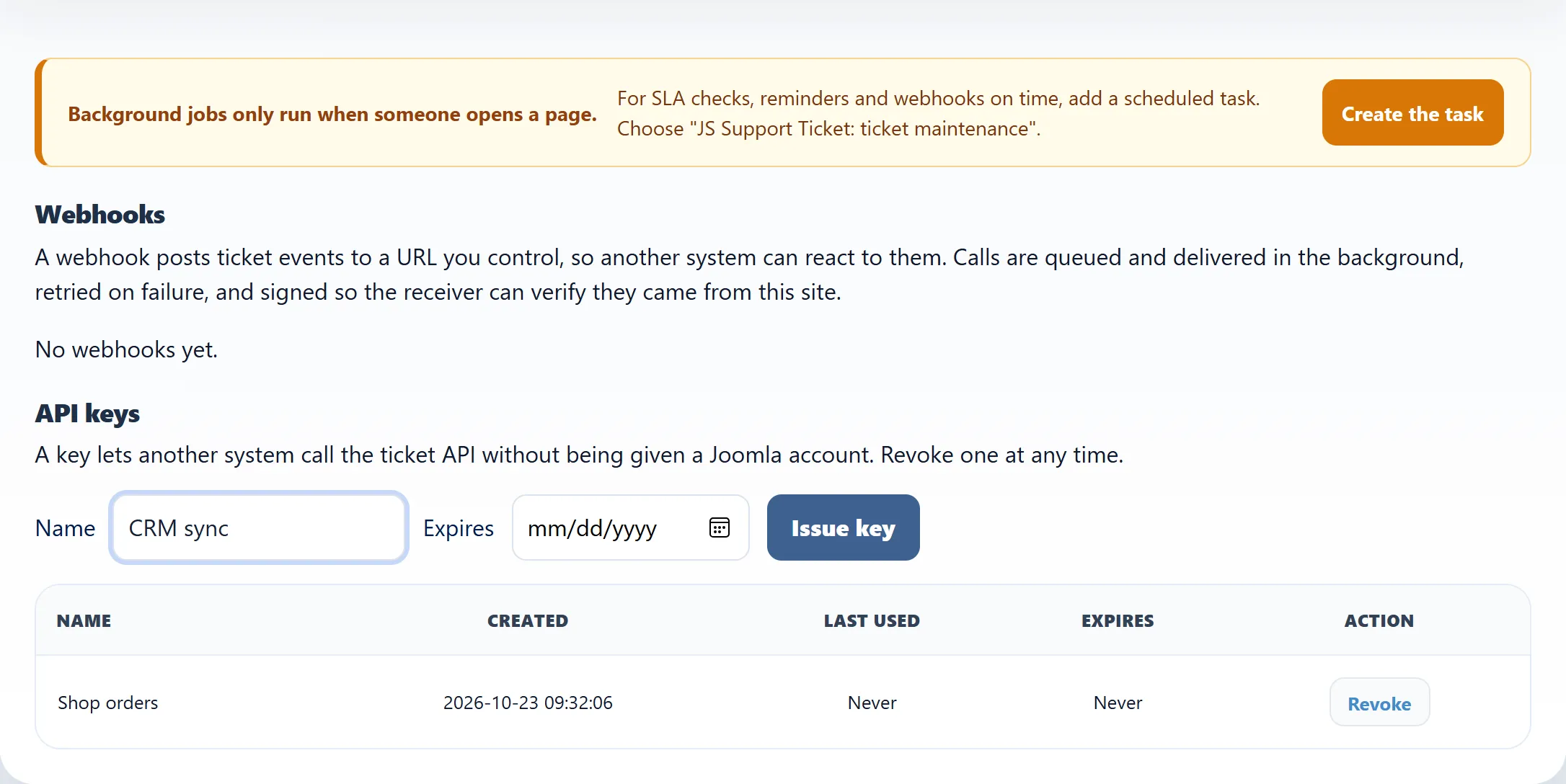
Go to Flow → Integrations.
-
Under API keys, enter a Name that tells you which system the key is for, such as “CRM sync”.
-
Optionally pick an Expires date. The key stops working at the start of that day. Leave it empty for a key that doesn’t expire.
-
Click Issue key.
-
Copy the key shown under Your new API key and store it somewhere safe. It starts with
jsst_.
The keys list
Section titled “The keys list”| Column | What it shows |
|---|---|
| Name | The name you gave the key. |
| Created | When it was issued. |
| Last used | When a call last used it, or Never. |
| Expires | When it stops working, or Never. |
| Action | Revoke deletes the key. Calls using it stop working at once. |
Issue a separate key for each system that calls the API. Then you can revoke one without breaking the others, and Last used tells you which systems are still active.
Keeping the API closed
Section titled “Keeping the API closed”If you don’t use the API, switch off Web Services - JS Support Ticket under System → Manage → Plugins. Updating the component switches it back on, so check it again after each update.