
Mail queue and email logs
Sending now or from the queue
Section titled “Sending now or from the queue”System → Settings → General Settings → Outgoing Mail Delivery decides when notifications leave the site.

| Option | What happens |
|---|---|
| Send immediately (default) | Each email is sent during the page request that caused it, such as an agent’s reply. If sending fails, the message goes into the queue and is retried. |
| Send from the queue | Nothing is sent during the request. Every email goes into the queue and is sent by the next background run, so a slow mail server never holds up an agent or a customer. A queued message waits at least a minute. |
What sends the queue
Section titled “What sends the queue”The queue is worked through by the help desk’s background runs:
- On page load. While Run Background Tasks On Page Load (same tab) is Yes, the first visit to a JS Support Ticket page after the last run starts one, at most every 30 minutes. It sends up to 50 queued messages.
- Joomla’s task scheduler. The task JS Support Ticket: send queued email, set up under System → Scheduled Tasks, sends up to 100 queued messages each time it runs. The JS Support Ticket: ticket maintenance task also sends the queue, along with its other work.
If you choose Send from the queue, make sure one of these runs often enough. With page-load runs only, mail can wait up to half an hour, or longer on a quiet site.
Retries
Section titled “Retries”A message that fails is tried up to five times in all. The waits between tries grow: 1, 2, 4 and then 8 minutes, counted from the attempt, though nothing is retried until a background run comes round. After the fifth failure the message is marked failed and left in the queue table with its last error. A message caught mid-send by a crash is released for another try after 30 minutes.
There is no screen that lists the queue itself. Each attempt, including every retry, appears in Email Logs.
Addresses that bounce
Section titled “Addresses that bounce”When a ticket-via-email mailbox receives a delivery failure report, the help desk records the bounce against the address that failed. After three hard bounces the address is suppressed: the help desk stops mailing it, and each email it would have sent is logged as suppressed. Soft bounces, such as a full mailbox, are counted but never suppress an address.
Email Logs
Section titled “Email Logs”Email → Email Logs lists every attempt to send a help desk email, newest first, under Outgoing Email Attempts.
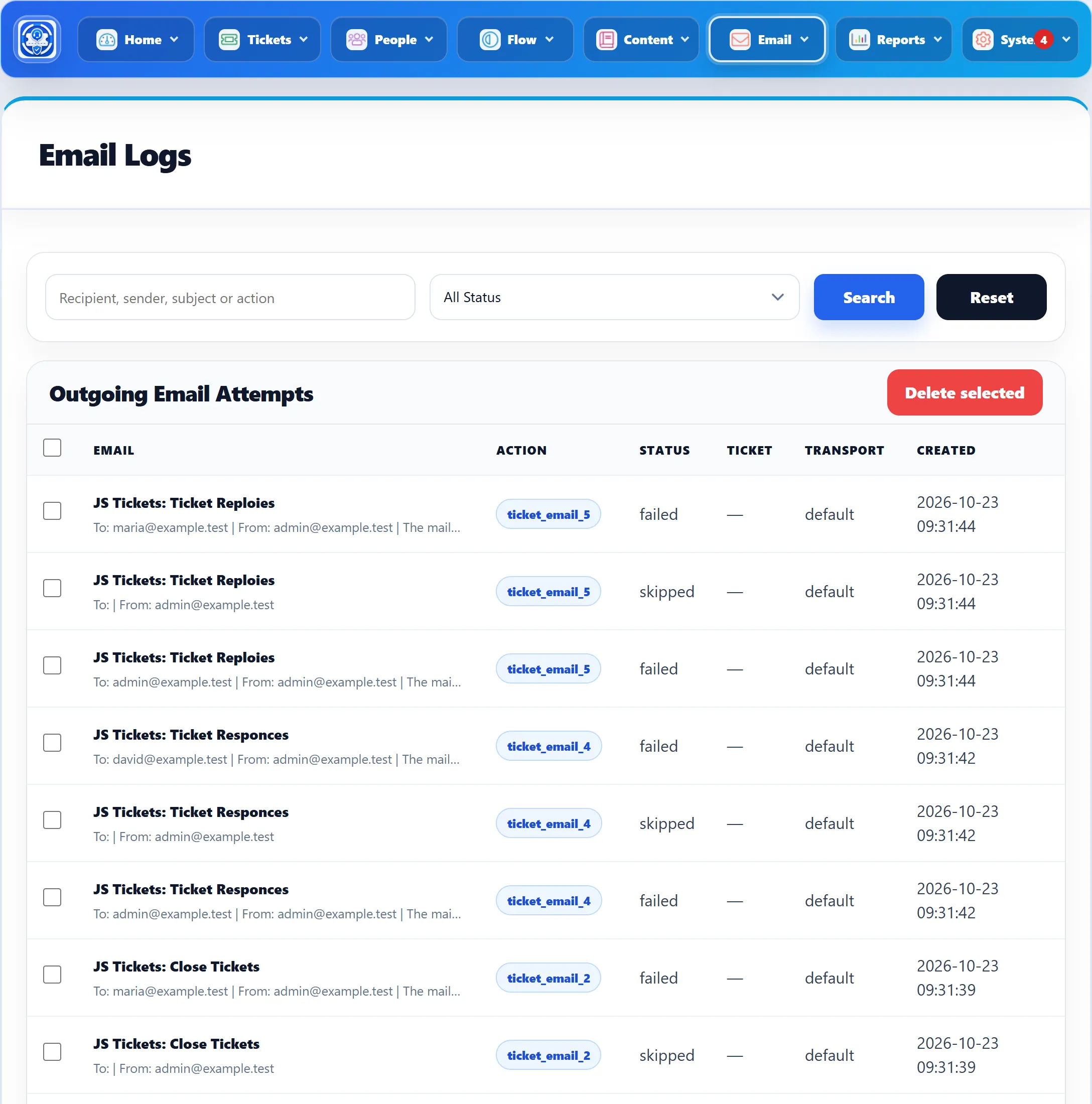
| Column | What it shows |
|---|---|
| The subject, then To, From and, for a failed attempt, the error. | |
| Action | Which email it was, as a code. See below. |
| Status | sent, failed, skipped or suppressed. See below. |
| Ticket | Not filled in by 1.3.0; it shows a dash. |
| Transport | default (Joomla’s mailer), smtp (the system email’s own SMTP server), none (not sent because the address is suppressed) or imap (an incoming message, see below). |
| Created | When the attempt was made. |
The search box (Recipient, sender, subject or action) matches any of those, and All Status narrows the list to Sent, Failed or Skipped. Reset clears both.
To clear old entries, tick them (or the box in the header to tick the whole page) and click Delete selected. This cannot be undone.
Statuses
Section titled “Statuses”- sent: the mailer accepted the message.
- failed: the mailer refused it or the mail server couldn’t be reached. The message was queued for a retry.
- skipped: there was nobody to send to, or no sender. The usual cause is a notification for Staff on a ticket nobody is assigned to.
- suppressed: the recipient has bounced too often; see above.
Incoming messages that ticket via email deliberately ignores, such as out-of-office replies and mailing-list mail, are also logged here, as skipped with the transport imap and the action incoming_skipped.
Action codes
Section titled “Action codes”Ticket emails are logged as ticket_email_ followed by a number:
| Code | |
|---|---|
| 1 | New ticket |
| 2 | Ticket closed |
| 3 | Ticket deleted |
| 4 | Staff or administrator reply (watcher emails also use 4) |
| 5 | Customer reply |
| 6 | Ticket locked |
| 7 | Ticket unlocked |
| 8 | Marked overdue |
| 9 | Marked in progress |
| 11 | Priority changed |
| 12 | Department transfer |
| 13 | Ticket reassigned |
| 14 | Reply to a closed ticket refused |
| 15 | Feedback request |
Ban-list and data-erasure emails reuse the codes ticket_email_1 and
ticket_email_2; the subject tells them apart.
The demo and test sites
Section titled “The demo and test sites”If Joomla’s Send Mail is switched off in Global Configuration, every Default email is logged as failed. That is what the screenshot above shows.