
The dashboard
The dashboard is the first screen under Components → JS Accessibility Fixer. It shows how your site is doing and what is waiting for you.
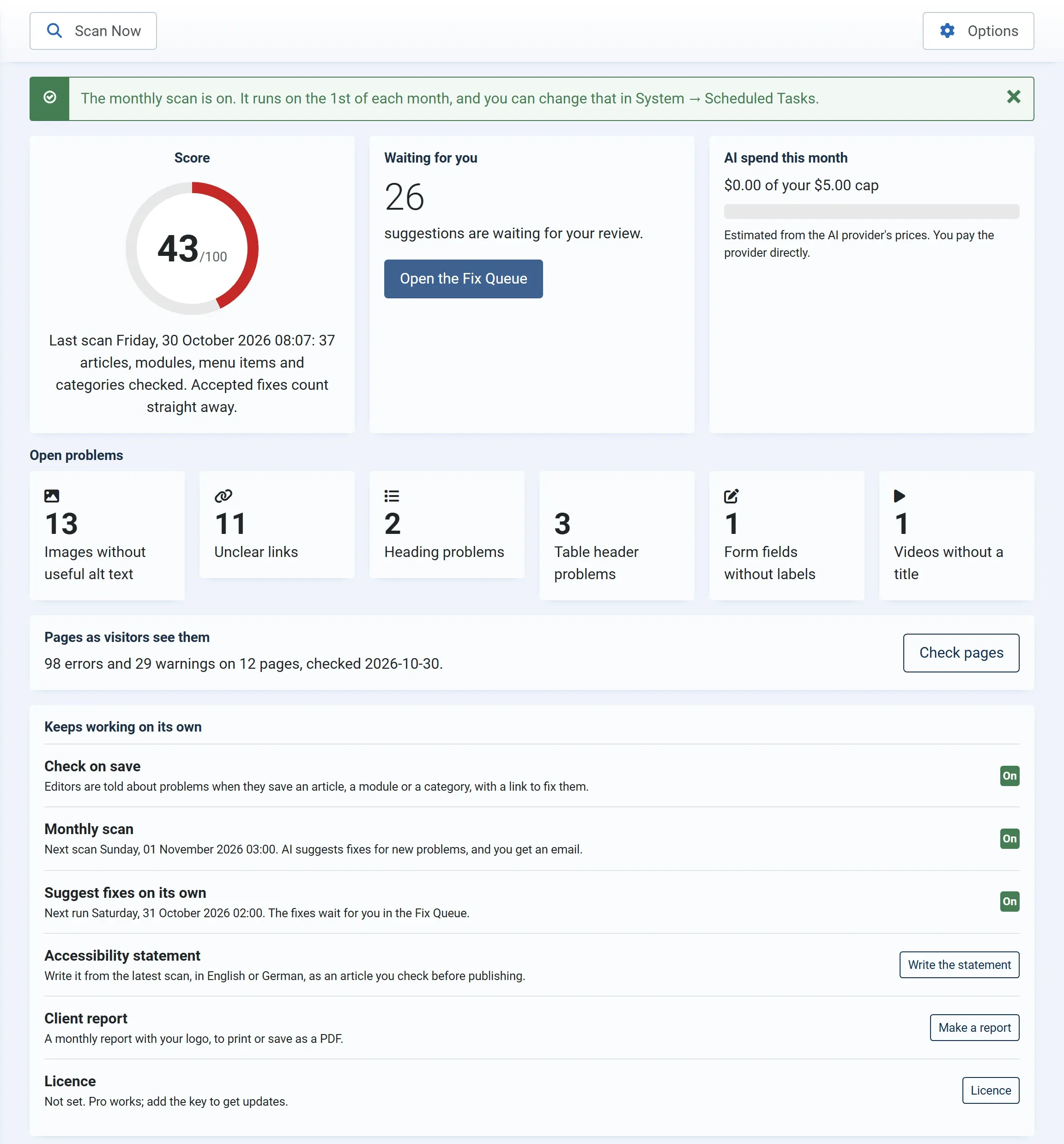
Toolbar
Section titled “Toolbar”- Scan Now scans the site again. See Your first scan.
- Options opens the AI settings and the permissions. See Options.
The ring shows the score of the latest scan, out of 100, with the date and how many articles, modules, menu items and categories were checked. Accepted fixes count straight away, so you don’t need to scan again to see the score rise. After a few scans, a small bar chart under the ring shows the score over recent scans. See The score.
Waiting for you
Section titled “Waiting for you”How many AI suggestions are ready for you to check and accept. Open the Fix Queue takes you to them.
AI spend this month
Section titled “AI spend this month”What the AI suggestions have cost this month, against your monthly spend cap, for example $0.42 of your $5.00 cap. The cost is worked out from the AI provider’s prices; you pay the provider directly. In the free version, this card also counts the AI suggestions used out of the 50 a month. See Costs and the spend cap.
If no AI is set up yet, the card has a Set up AI button that opens the Options.
Open problems
Section titled “Open problems”One card for each kind of problem the latest scan found:
| Card | Opens the Fix Queue at |
|---|---|
| Images without useful alt text | Images without alt text, or with a file name or a word like “image” as alt text |
| Unclear links | Links with no text, or with text like “click here” or “read more” |
| Heading problems | Skipped heading levels and empty headings |
| Table header problems | Tables without header cells, and empty header cells |
| Form fields without labels | Form fields a screen reader cannot name |
| Videos without a title | YouTube, Vimeo and other embeds without a title |
Pages as visitors see them
Section titled “Pages as visitors see them”The result of the last page check, such as 98 errors and 29 warnings on 12 pages. Check pages opens the Pages screen. See Pages as visitors see them.
Keeps working on its own
Section titled “Keeps working on its own”| Row | What it shows |
|---|---|
| Check on save | On while the content plugin is on. See Check on save. |
| Monthly scan (Pro) | Turn On, or the date of the next scan. See Monthly scan and email. |
| Suggest fixes on its own (Pro) | Turn On, or the date of the next run. See Suggest fixes on its own. |
| Accessibility statement (Pro) | Write the statement. See Accessibility statement. |
| Client report (Pro) | Make a report. See Client report. |
| Licence (Pro) | Whether your licence key is active. See Licence key. |
The monthly scan and nightly suggestions are Joomla scheduled tasks. Once they are on, you change their times or turn them off in System → Scheduled Tasks. See Scheduled tasks and cron.