
Pages as visitors see them
The scan checks your content where it is stored. Some problems only appear on the finished page, where your content meets the template: text with too little contrast, a page without a main heading, a button without a name. The Pages screen finds them.
It opens each page as a guest sees it and runs Sa11y on it, the accessibility checker that comes with Joomla 5.4 and 6. Nothing is sent outside your site, and no AI is used.
Checking your pages
Section titled “Checking your pages”-
Go to Components → JS Accessibility Fixer → Pages, or click Check pages on the dashboard.
-
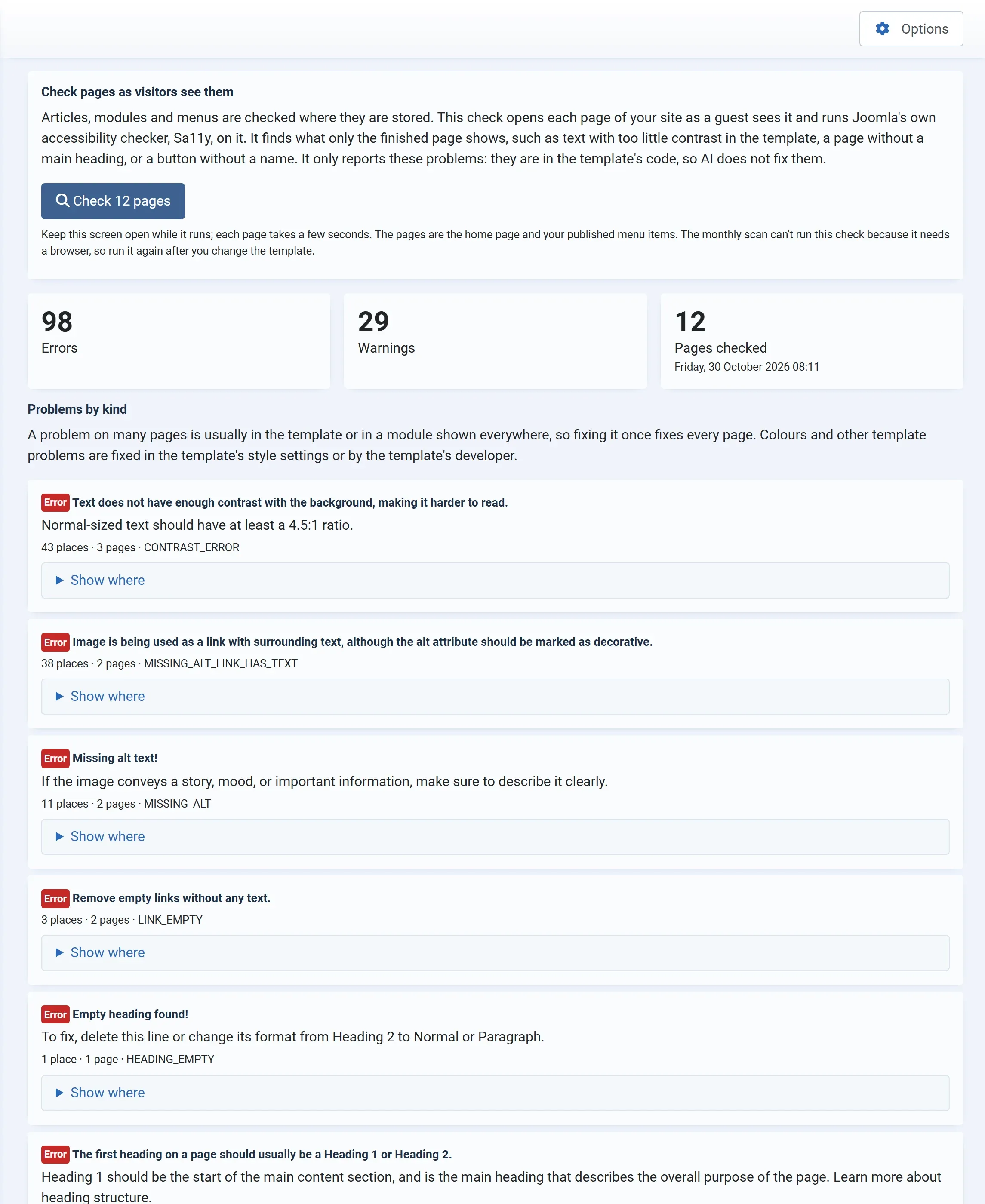
Press Check 12 pages. The number is your home page plus your published menu items.
-
Keep the screen open while it runs. Each page takes a few seconds, and the screen says which page it is on, such as Checking page 3 of 12: Our menu.
-
When it is done, the results load.
Reading the results
Section titled “Reading the results”- Errors, Warnings, Pages checked: the totals, with the date of the check.
- Problems by kind: one card for each kind of problem, with Sa11y’s explanation, how many places and pages it was found on, and Sa11y’s name for it, such as
CONTRAST_ERROR. A problem repeated on many pages is listed once. - Show where: the places, and See it on “Our menu” to open a page where it appears.
- Pages checked: a list of every page with its errors and warnings. A page that could not be checked says Not checked.
Fixing what it finds
Section titled “Fixing what it finds”These problems are in the template or in modules shown on every page, not in your articles, so the AI doesn’t fix them. A problem on many pages is usually fixed once:
- Colours and contrast: in the template’s style settings (System → Site Template Styles), or by the template’s developer.
- Headings and landmarks of the page: in the template, or in the module that shows the heading.
- Problems in your own content that the scan also finds, such as missing alt text, are fixed in the Fix Queue.
Run the check again after you change the template.
Good to know
Section titled “Good to know”- The check runs in your browser, so the monthly scan can’t run it. The dashboard and the client report show the last result.
- A page that doesn’t allow being shown in a frame can’t be checked; the screen says Could not check … It may not allow being shown in a frame. Moving on.
- Pages that need a login are checked as a guest sees them.
- The check needs Sa11y 4 or later, which comes with Joomla 5.4 and 6.